

- Posts: 4
- Thank you received: 5
HD2 Modding Toolkit
- argadelis
-
 Topic Author
- Offline
- I like having an impact on the fun!
Less
More
3 weeks 1 hour ago - 3 weeks 1 hour ago #1
by argadelis
HD2 Modding Toolkit was created by argadelis
Hi everyone,I would like to warmly present to you the fruits of my recent, humble work on the game.
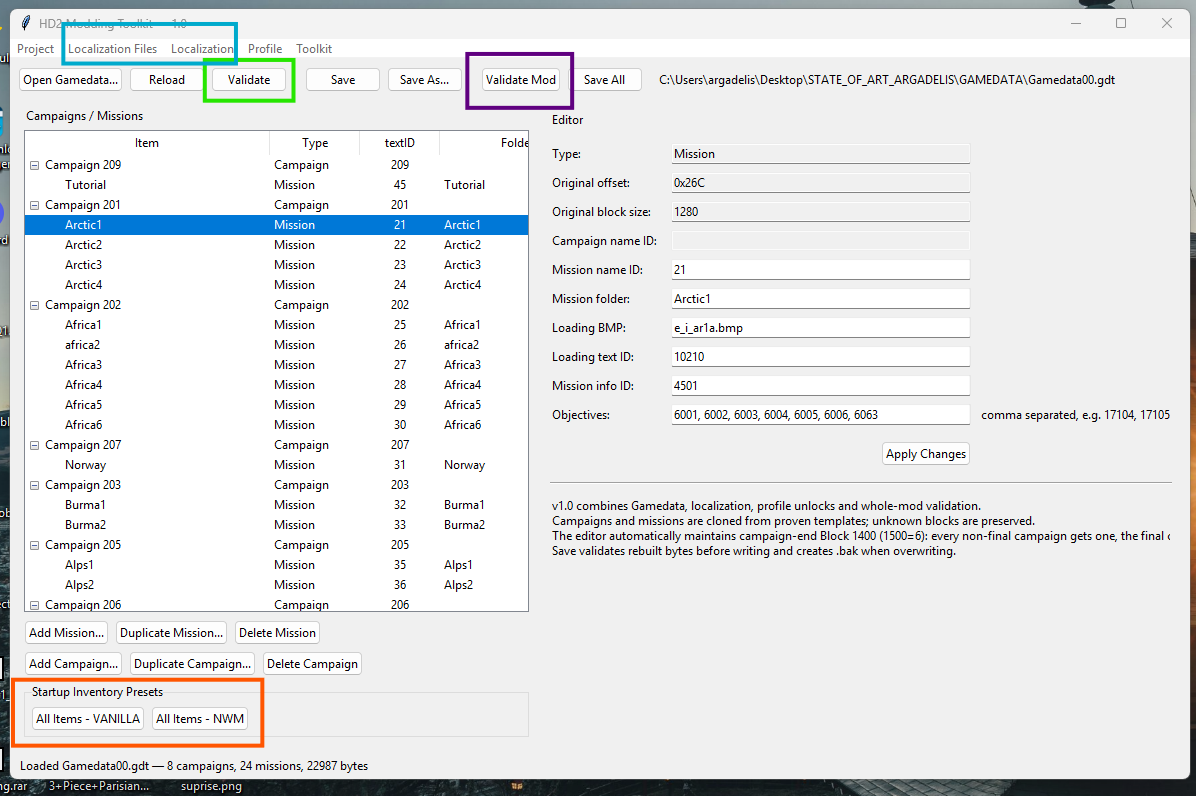
HD2 Modding Toolkit is a utility for Hidden & Dangerous 2 and Hidden & Dangerous 2: Sabre Squadron.
It combines several manual modding tasks into one application and helps edit campaigns, missions, localization files and player-profile mission unlocks.
Supported files:
- Gamedata00.gdt
- Gamedata01.gdt
- Dialogs.bin and Dialogs_DD.bin (therefore TEXTY / TEXTY.txt and TEXTY_DD / TEXTY_DD.txt)
- profile.sav
The toolkit works with the internal block structure of Gamedata files instead of relying on fixed absolute offsets.
1. GAMEDATA EDITOR
Open Gamedata00.gdt or Gamedata01.gdt to display the campaign and mission tree.
For campaigns you can:
- edit Campaign name ID
- Add Campaign
- Duplicate Campaign
- Delete Campaign
For missions you can edit:
- Mission name ID
- Mission folder
- Loading BMP
- Loading text ID
- Mission info ID
- Objectives
You can also:
- Add Mission
- Duplicate Mission
- Delete Mission
New campaigns and missions are created from existing working templates.
Unknown blocks are preserved whenever possible.
The toolkit automatically maintains campaign-ending Block 1400 structures and recalculates affected block bytecounts after structural changes.
2. STARTUP INVENTORY PRESETS
Two presets are available:
- All Items - VANILLA
- All Items - NWM
VANILLA adds the supported original H&D2 / Sabre Squadron item set.
NWM adds the VANILLA set plus the additional NWM Mod item range.
Configured quantities:
- firearm / launcher: 4
- ammunition: 20
- uniform / helmet / cap / hat: 4
- equipment / explosives / mission items: 20
- melee weapons: 4
For firearms, ammunition uses the same item ID with the ammunition flag enabled.
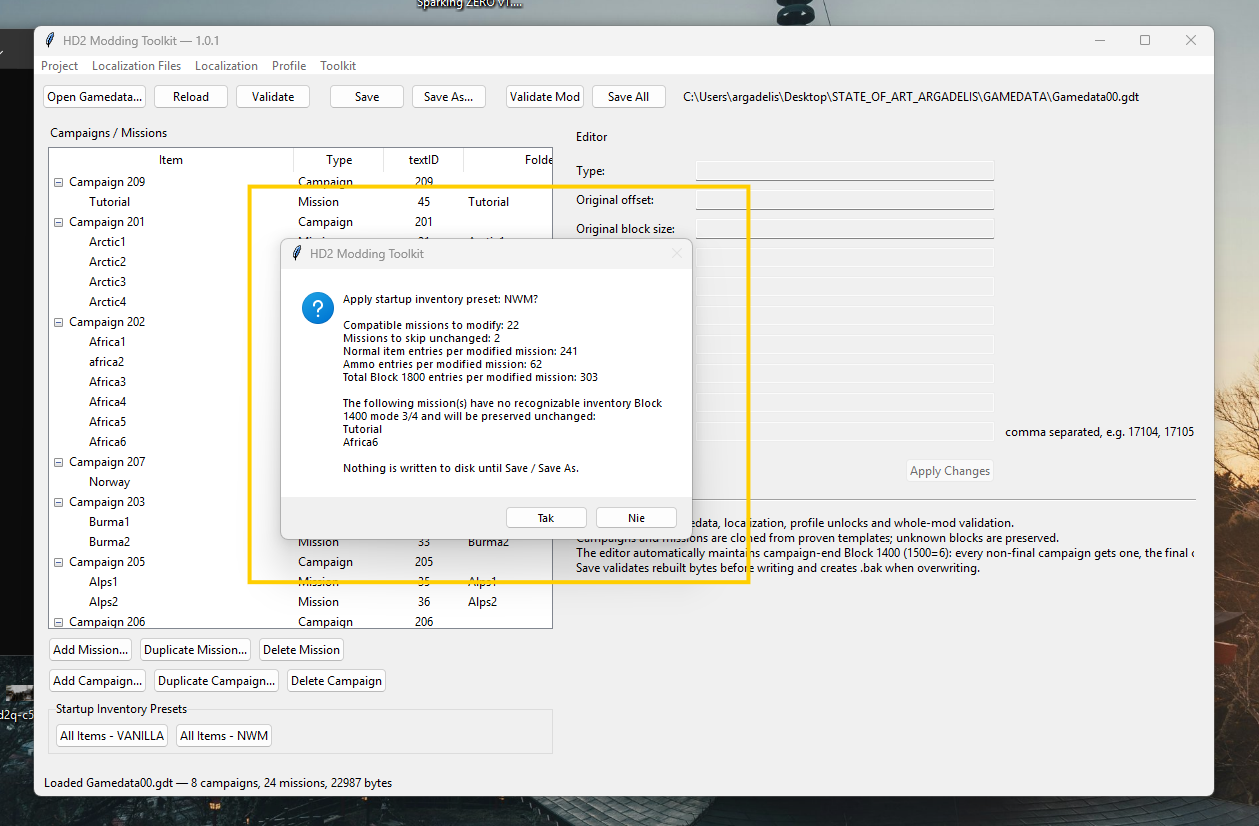
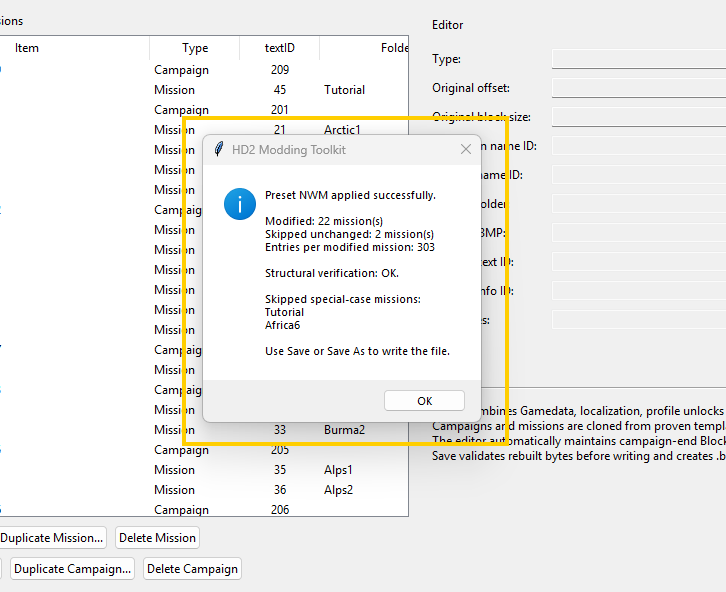
The preset is applied to all compatible missions in the currently opened
Gamedata file.
Special missions without a standard inventory Block 1400 mode 3/4 are skipped and preserved unchanged.
Example:
Modified: 22 missions
Skipped unchanged: 2 missions
This prevents the toolkit from forcing an unknown inventory structure into special-case missions.
3. LOCALIZATION MANAGER
The Localization Manager works with:
- TEXTY_DD
- Dialogs_DD.bin
Current Mission
Shows localization IDs used by the selected campaign/mission:
- Campaign name
- Mission name
- Loading description
- Mission information
- Objectives
TEXTY_DD Editor
You can:
- search by ID
- search by text
- edit existing entries
- add new entries
- find the next free ID in a selected range
Dialogs_DD Editor
You can:
- browse Dialog IDs
- edit dialog entries
- add new Dialog IDs
The function:
Sync Missing 8-digit Dialog IDs from TEXTY
adds missing 8-digit IDs from TEXTY_DD to Dialogs_DD.bin.
Existing Dialogs_DD records are not overwritten.
4. PROFILE MANAGER
Custom missions may exist correctly in Gamedata but remain hidden in the game
because profile.sav stores the highest unlocked mission index.
The toolkit supports:
- Block 1F05 - Original H&D2
- Block 1F06 - Sabre Squadron
You can edit these values manually or use:
Auto Unlock Current Gamedata
The toolkit calculates the recommended zero-based maximum mission index from the number of missions in the currently loaded Gamedata file.
Example:
13 missions -> recommended max index = 12
Only the first int32 value in 1F05 / 1F06 is changed by the unlock function.
Other profile values and blocks are preserved.
5. OPEN MOD FOLDER
Use:
Project -> Open Mod Folder...
The toolkit searches the selected folder for supported files such as:
- Gamedata00.gdt
- Gamedata01.gdt
- TEXTY_DD
- Dialogs_DD.bin
- profile.sav
If both Gamedata00 and Gamedata01 are present, the application asks which one you want to work with.
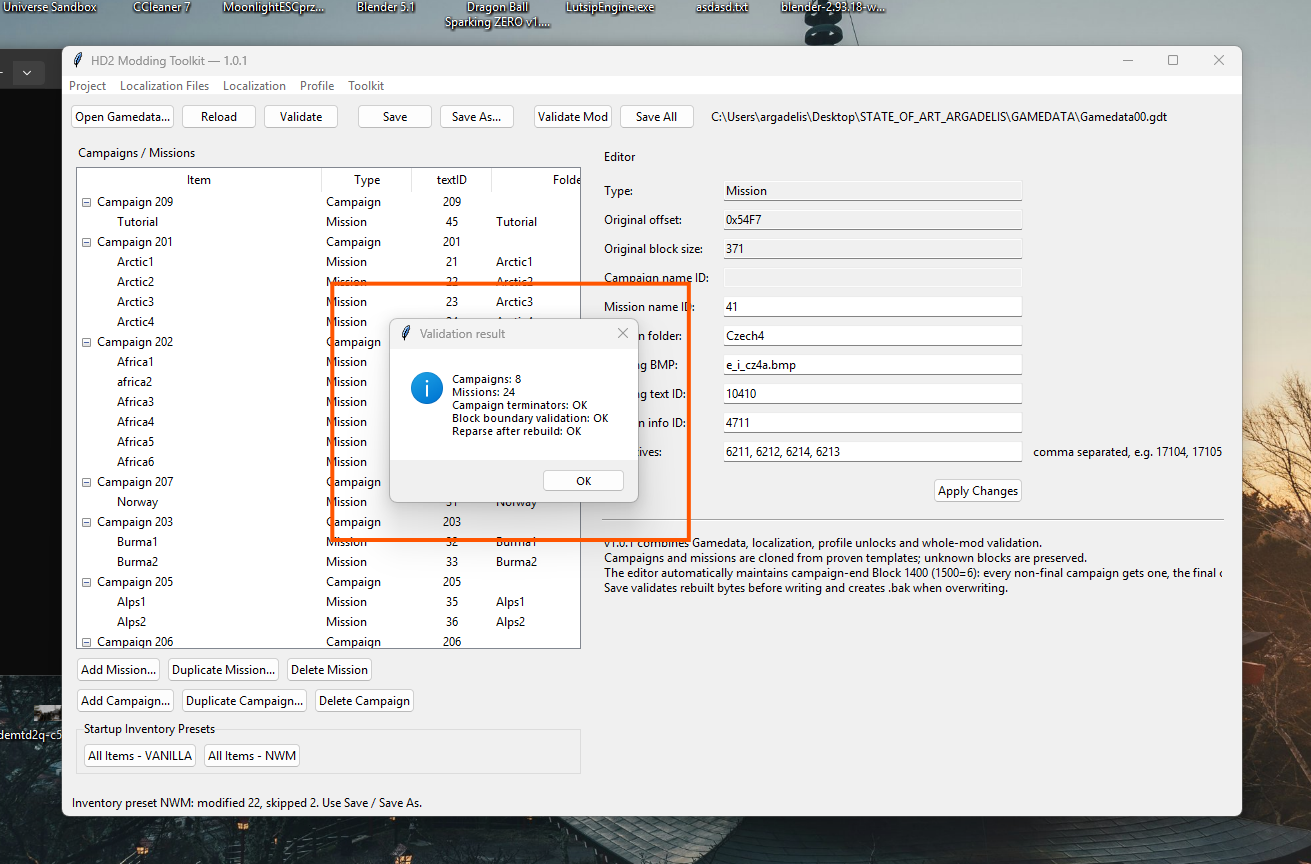
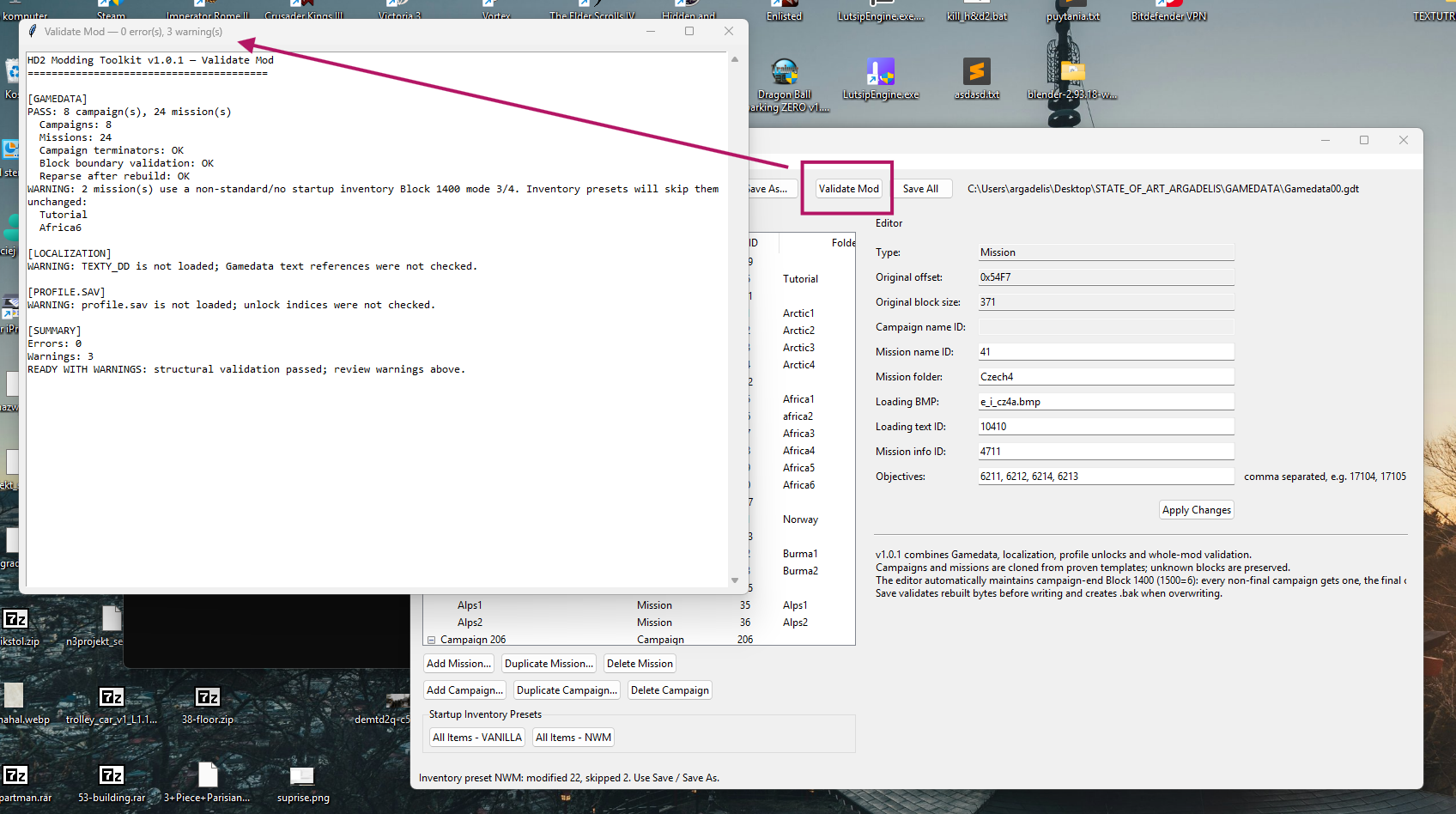
6. VALIDATE MOD
Validate Mod performs a combined project check.
It can verify:
- Gamedata block structure
- campaigns
- missions
- campaign terminators
- duplicate mission folders
- TEXTY_DD references
- missing localization IDs
- duplicate TEXTY_DD IDs
- Dialogs_DD references
- profile unlock index
- startup inventory compatibility
Results are classified as:
PASS
The checked component is valid.
WARNING
The mod may still be valid, but something should be reviewed.
Warnings do not necessarily mean the mod is broken.
ERROR
A structural or reference problem was detected and should normally be fixed before treating the package as ready.
Possible summary states:
- READY
- READY WITH WARNINGS
- NOT READY
7. SAVE / SAVE AS / SAVE ALL
Save
----
Saves the currently opened Gamedata file.
Save As
Creates a separate Gamedata file.
Recommended while testing major changes.
Save All
Validates and saves all loaded modified components:
- Gamedata
- TEXTY_DD
- Dialogs_DD.bin
- profile.sav
If Validate Mod finds errors, Save All is blocked.
If only warnings are found, the toolkit asks whether you want to continue.
When an existing destination file is overwritten, a .bak backup is created.
Example:
Gamedata01.gdt
Gamedata01.gdt.bak
8. RECOMMENDED WORKFLOW - NEW MISSION
1. Open Gamedata00.gdt or Gamedata01.gdt.
2. Select the target campaign.
3. Click Add Mission.
4. Choose a proven mission as the template.
5. Configure:
- mission folder
- Mission name ID
- Loading BMP
- Loading text ID
- Mission info ID
- Objectives
6. Open TEXTY_DD.
7. Add the required localization text.
8. Open Dialogs_DD.bin if custom 8-digit dialog/subtitle IDs are required.
9. Open profile.sav.
10. Use Auto Unlock Current Gamedata.
11. Run Validate Mod.
12. Correct any ERROR entries.
13. Use Save All.
14. Test the mission in Hidden & Dangerous 2.
9. RECOMMENDED WORKFLOW - NEW CAMPAIGN
1. Open Gamedata.
2. Select a suitable existing campaign/template.
3. Click Add Campaign.
4. Select:
- campaign structure template
- first mission template
5. Enter a new Campaign name ID.
6. Configure the first mission.
7. Add further missions using Add Mission.
8. Add the required TEXTY_DD entries.
9. Update profile.sav using Auto Unlock Current Gamedata.
10. Run Validate Mod.
11. Use Save All.
12. Test the campaign in-game.
10. SAFETY
Always keep untouched copies of original game files.
During development, prefer Save As when testing large changes.
The toolkit creates .bak backups when overwriting existing files, but in-game testing is still recommended after major modifications.
Unknown Gamedata blocks are preserved whenever possible because the full H&D2
binary format is not completely documented.
11. WHAT THE TOOLKIT DOES NOT REPLACE
HD2 Modding Toolkit focuses on campaign-level and mission-integration data.
It does not replace tools used for:
- map editing
- 4DS models
- Blender / 3DS Max work
- Actors.bin editing
- Tree / KLZ editing
- mission .scr scripting
- LuitSip Editor work
Those tools are still needed for actual map, actor, script, model, sector and collision editing.
HD2 Modding Toolkit is designed to handle the surrounding Gamedata, localization, profile and campaign-integration layer.
DOWNLOAD
I hope you're liked it and... will show me some new SP missions in the near future!
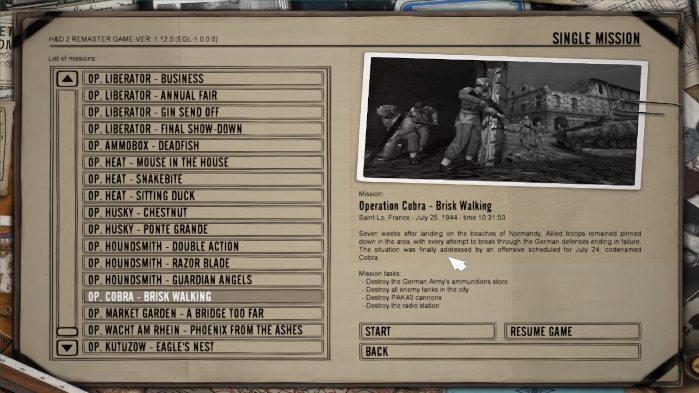
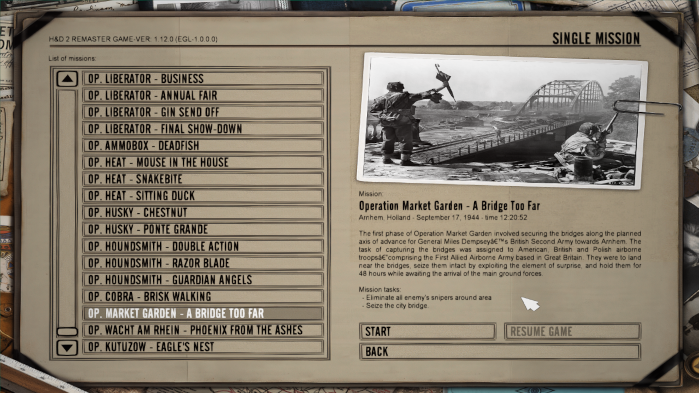
P.S. Right now I'm working on new missions. Uploaded some pics.
It combines several manual modding tasks into one application and helps edit campaigns, missions, localization files and player-profile mission unlocks.
Supported files:
- Gamedata00.gdt
- Gamedata01.gdt
- Dialogs.bin and Dialogs_DD.bin (therefore TEXTY / TEXTY.txt and TEXTY_DD / TEXTY_DD.txt)
- profile.sav
The toolkit works with the internal block structure of Gamedata files instead of relying on fixed absolute offsets.
1. GAMEDATA EDITOR
Open Gamedata00.gdt or Gamedata01.gdt to display the campaign and mission tree.
For campaigns you can:
- edit Campaign name ID
- Add Campaign
- Duplicate Campaign
- Delete Campaign
For missions you can edit:
- Mission name ID
- Mission folder
- Loading BMP
- Loading text ID
- Mission info ID
- Objectives
You can also:
- Add Mission
- Duplicate Mission
- Delete Mission
New campaigns and missions are created from existing working templates.
Unknown blocks are preserved whenever possible.
The toolkit automatically maintains campaign-ending Block 1400 structures and recalculates affected block bytecounts after structural changes.
2. STARTUP INVENTORY PRESETS
Two presets are available:
- All Items - VANILLA
- All Items - NWM
VANILLA adds the supported original H&D2 / Sabre Squadron item set.
NWM adds the VANILLA set plus the additional NWM Mod item range.
Configured quantities:
- firearm / launcher: 4
- ammunition: 20
- uniform / helmet / cap / hat: 4
- equipment / explosives / mission items: 20
- melee weapons: 4
For firearms, ammunition uses the same item ID with the ammunition flag enabled.
The preset is applied to all compatible missions in the currently opened
Gamedata file.
Special missions without a standard inventory Block 1400 mode 3/4 are skipped and preserved unchanged.
Example:
Modified: 22 missions
Skipped unchanged: 2 missions
This prevents the toolkit from forcing an unknown inventory structure into special-case missions.
3. LOCALIZATION MANAGER
The Localization Manager works with:
- TEXTY_DD
- Dialogs_DD.bin
Current Mission
Shows localization IDs used by the selected campaign/mission:
- Campaign name
- Mission name
- Loading description
- Mission information
- Objectives
TEXTY_DD Editor
You can:
- search by ID
- search by text
- edit existing entries
- add new entries
- find the next free ID in a selected range
Dialogs_DD Editor
You can:
- browse Dialog IDs
- edit dialog entries
- add new Dialog IDs
The function:
Sync Missing 8-digit Dialog IDs from TEXTY
adds missing 8-digit IDs from TEXTY_DD to Dialogs_DD.bin.
Existing Dialogs_DD records are not overwritten.
4. PROFILE MANAGER
Custom missions may exist correctly in Gamedata but remain hidden in the game
because profile.sav stores the highest unlocked mission index.
The toolkit supports:
- Block 1F05 - Original H&D2
- Block 1F06 - Sabre Squadron
You can edit these values manually or use:
Auto Unlock Current Gamedata
The toolkit calculates the recommended zero-based maximum mission index from the number of missions in the currently loaded Gamedata file.
Example:
13 missions -> recommended max index = 12
Only the first int32 value in 1F05 / 1F06 is changed by the unlock function.
Other profile values and blocks are preserved.
5. OPEN MOD FOLDER
Use:
Project -> Open Mod Folder...
The toolkit searches the selected folder for supported files such as:
- Gamedata00.gdt
- Gamedata01.gdt
- TEXTY_DD
- Dialogs_DD.bin
- profile.sav
If both Gamedata00 and Gamedata01 are present, the application asks which one you want to work with.
6. VALIDATE MOD
Validate Mod performs a combined project check.
It can verify:
- Gamedata block structure
- campaigns
- missions
- campaign terminators
- duplicate mission folders
- TEXTY_DD references
- missing localization IDs
- duplicate TEXTY_DD IDs
- Dialogs_DD references
- profile unlock index
- startup inventory compatibility
Results are classified as:
PASS
The checked component is valid.
WARNING
The mod may still be valid, but something should be reviewed.
Warnings do not necessarily mean the mod is broken.
ERROR
A structural or reference problem was detected and should normally be fixed before treating the package as ready.
Possible summary states:
- READY
- READY WITH WARNINGS
- NOT READY
7. SAVE / SAVE AS / SAVE ALL
Save
----
Saves the currently opened Gamedata file.
Save As
Creates a separate Gamedata file.
Recommended while testing major changes.
Save All
Validates and saves all loaded modified components:
- Gamedata
- TEXTY_DD
- Dialogs_DD.bin
- profile.sav
If Validate Mod finds errors, Save All is blocked.
If only warnings are found, the toolkit asks whether you want to continue.
When an existing destination file is overwritten, a .bak backup is created.
Example:
Gamedata01.gdt
Gamedata01.gdt.bak
8. RECOMMENDED WORKFLOW - NEW MISSION
1. Open Gamedata00.gdt or Gamedata01.gdt.
2. Select the target campaign.
3. Click Add Mission.
4. Choose a proven mission as the template.
5. Configure:
- mission folder
- Mission name ID
- Loading BMP
- Loading text ID
- Mission info ID
- Objectives
6. Open TEXTY_DD.
7. Add the required localization text.
8. Open Dialogs_DD.bin if custom 8-digit dialog/subtitle IDs are required.
9. Open profile.sav.
10. Use Auto Unlock Current Gamedata.
11. Run Validate Mod.
12. Correct any ERROR entries.
13. Use Save All.
14. Test the mission in Hidden & Dangerous 2.
9. RECOMMENDED WORKFLOW - NEW CAMPAIGN
1. Open Gamedata.
2. Select a suitable existing campaign/template.
3. Click Add Campaign.
4. Select:
- campaign structure template
- first mission template
5. Enter a new Campaign name ID.
6. Configure the first mission.
7. Add further missions using Add Mission.
8. Add the required TEXTY_DD entries.
9. Update profile.sav using Auto Unlock Current Gamedata.
10. Run Validate Mod.
11. Use Save All.
12. Test the campaign in-game.
10. SAFETY
Always keep untouched copies of original game files.
During development, prefer Save As when testing large changes.
The toolkit creates .bak backups when overwriting existing files, but in-game testing is still recommended after major modifications.
Unknown Gamedata blocks are preserved whenever possible because the full H&D2
binary format is not completely documented.
11. WHAT THE TOOLKIT DOES NOT REPLACE
HD2 Modding Toolkit focuses on campaign-level and mission-integration data.
It does not replace tools used for:
- map editing
- 4DS models
- Blender / 3DS Max work
- Actors.bin editing
- Tree / KLZ editing
- mission .scr scripting
- LuitSip Editor work
Those tools are still needed for actual map, actor, script, model, sector and collision editing.
HD2 Modding Toolkit is designed to handle the surrounding Gamedata, localization, profile and campaign-integration layer.
DOWNLOAD
I hope you're liked it and... will show me some new SP missions in the near future!
P.S. Right now I'm working on new missions. Uploaded some pics.
This attachment is hidden for guests.
Please log in or register to see it.
Please log in or register to see it.
This attachment is hidden for guests.
Please log in or register to see it.
Please log in or register to see it.
Attachments:
Last edit: 3 weeks 1 hour ago by argadelis.
The following user(s) said Thank You: snowman, JonnySniper
Please Log in or Create an account to join the conversation.
- snowman
-

- Offline
- Your most dear friend.
Less
More
- Posts: 7343
- Thank you received: 6204
1 week 4 days ago #2
by snowman
"Straight and narrow is the path."
Replied by snowman on topic HD2 Modding Toolkit
Many thanks, argadelis

I will add your Modding Toolkit to our Modding Tools page

I will add your Modding Toolkit to our Modding Tools page
"Straight and narrow is the path."
The following user(s) said Thank You: argadelis
Please Log in or Create an account to join the conversation.
Birthdays
- Pozytywnefloow
- Zbyl
- Matheo in 1 day
- jabas77 in 10 days
- Mata95cro in 10 days